
Powerful production, simplified
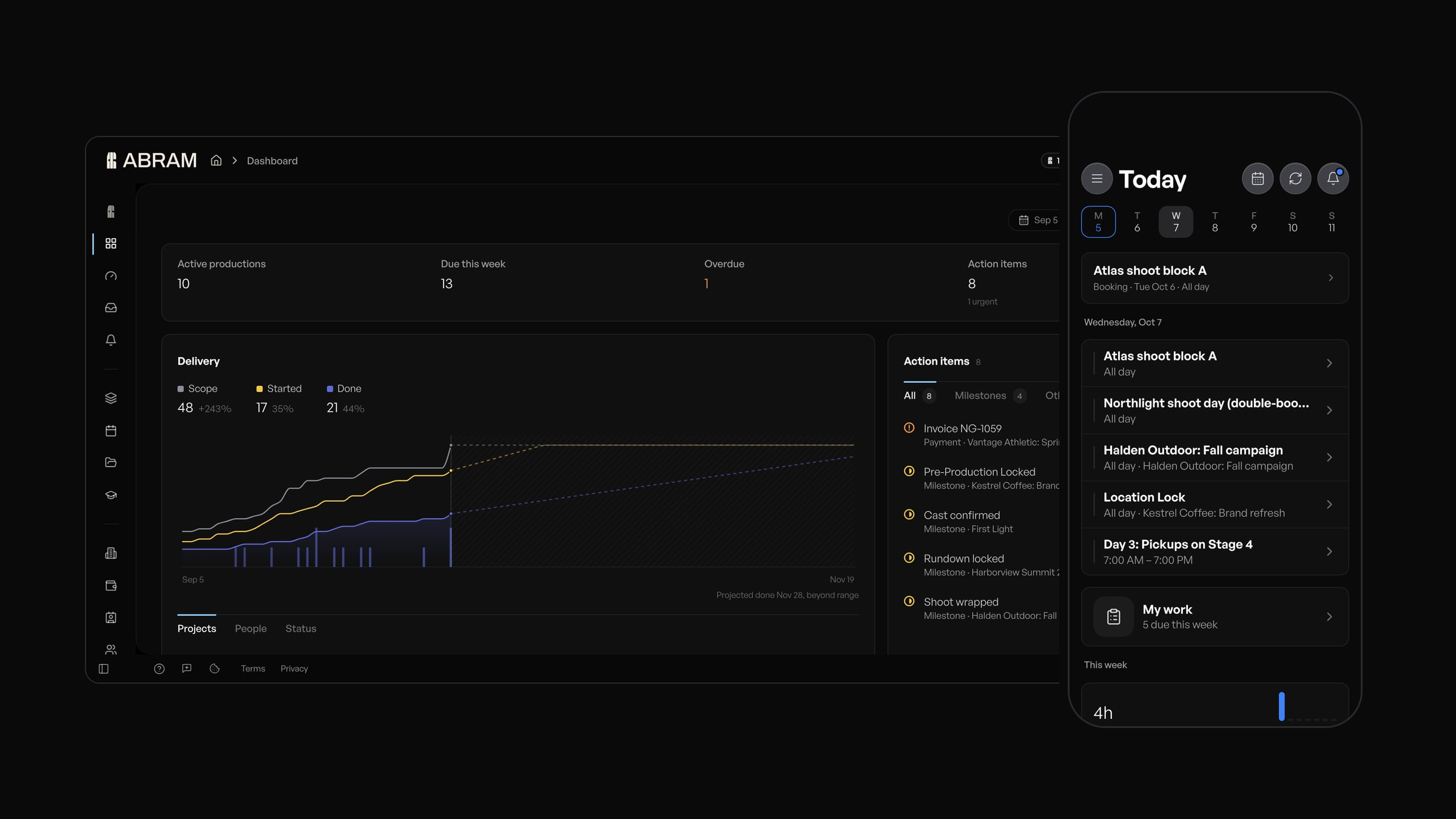 ABRAM 2.0, on your desktop and in your phone's browser.
ABRAM 2.0 is available today, and it is the biggest update to ABRAM yet. Every screen has been redesigned, Movie Magic schedules and budgets come straight in, ABRAM can staff an entire project for you to review, and your clients get a portal with your brand on it, where they leave notes at the exact second of the cut. From the first import to the client's sign-off, the whole production now runs in ABRAM, in your browser and on your phone.
An all-new design
ABRAM 2.0 redraws every screen to a single standard, from the dashboard to the last setting. Status reads the same everywhere, with one small glyph and one set of colours across deliverables, tasks, crew, gear, invoices and quotes.
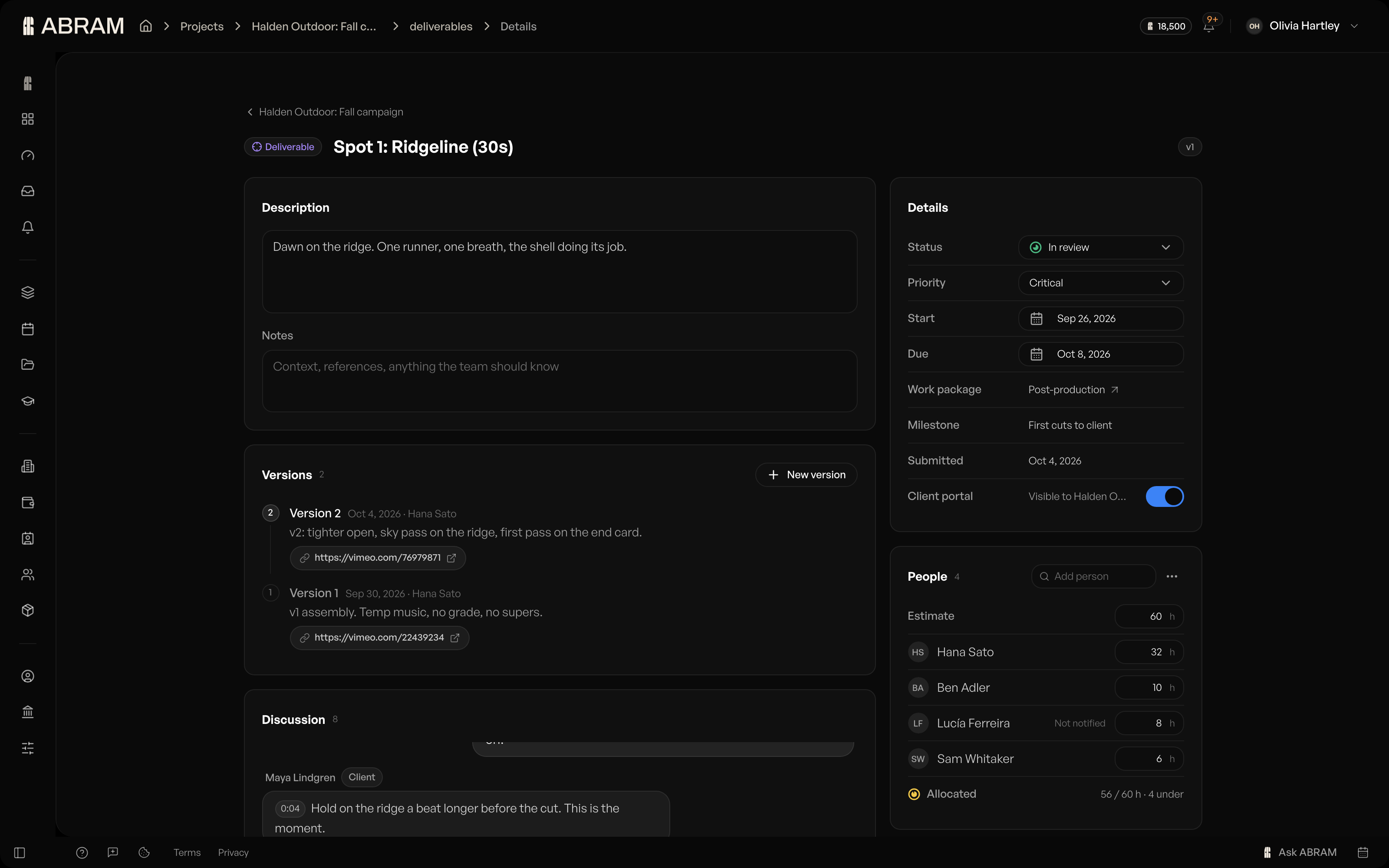 Deliverables open as full pages, with status, dates, people and the discussion in one view.
The new dashboard puts what's due this week, what's overdue and your action items right at the top, above a delivery chart of scope, started and done, and a money card. Deliverables and work orders now open as full pages, editors slide in beside the page you're on, and every setting lives in one window.
Bring your work with you
Drop a Movie Magic schedule onto a project and ABRAM reads the scenes, strips, elements, cast and call sheets, then shows you everything before a single thing is saved. The file is read right in your browser and never uploaded. Import it again later and ABRAM updates what changed, flagging any scene that has left the file while keeping it in your project.
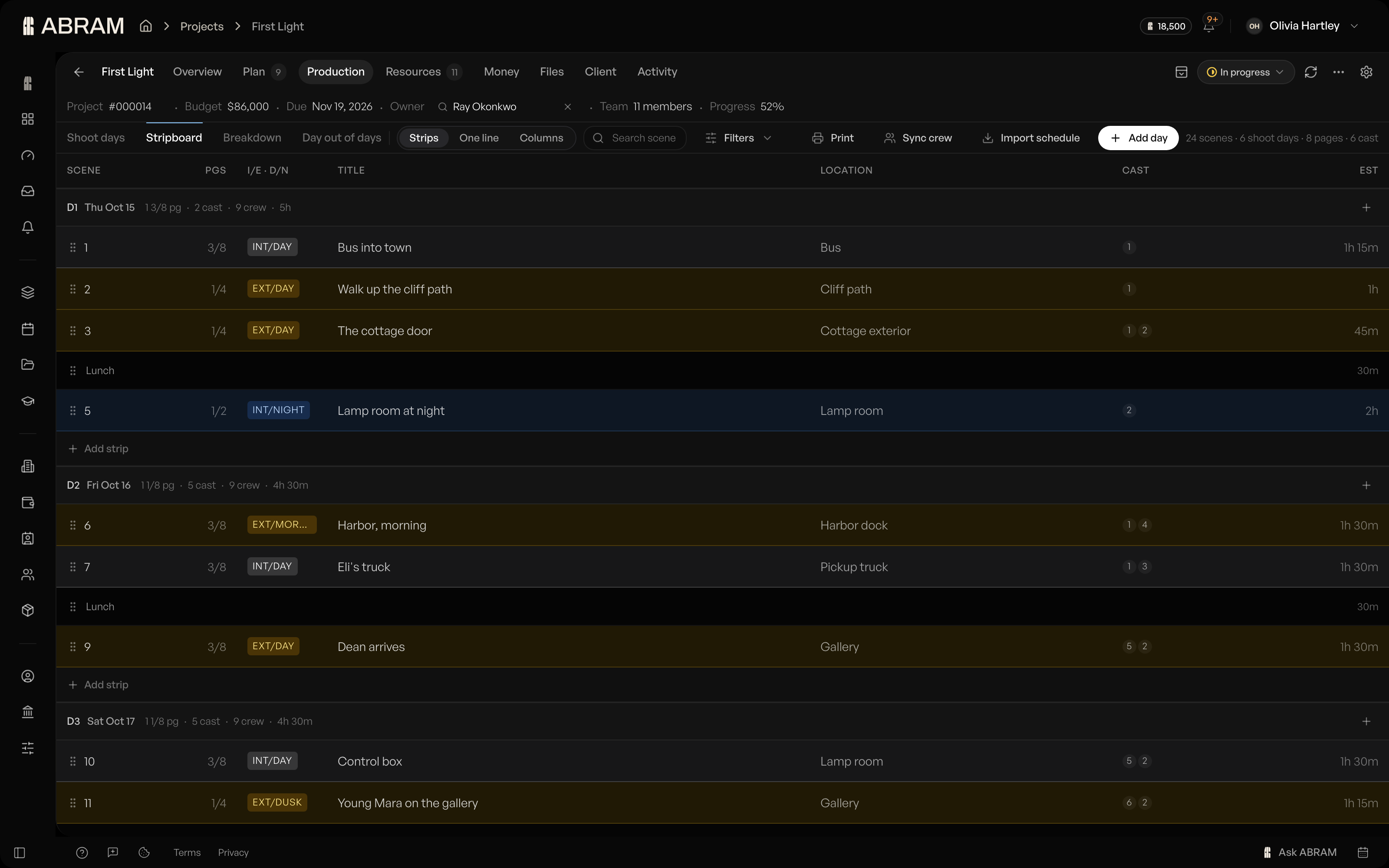 Scenes on the stripboard, grouped into shoot days and ready to move.
Budgets come in from a Movie Magic Budgeting export or a CSV, and scripts break down into scenes and elements on Pro and above. Whole projects arrive from a CSV, Jira, Asana or Monday, with their milestones, deliverables and checklists in place and people matched to your team. An owner or admin connects each tool once.
Starting from scratch takes a single screen. Tell ABRAM what you're making, add the client, dates, owner and budget, and press Draft with ABRAM to lay out the work packages, deliverables and milestones beside your answers, all editable in place.
A production tab built for the long shoot
Shoot days, the stripboard, the breakdown and day out of days now share one toolbar, and the stripboard is a single board built to carry a long shoot. The tab opens on Next up: the call sheets still in draft, the next day to send, and the scenes that aren't on a day yet.
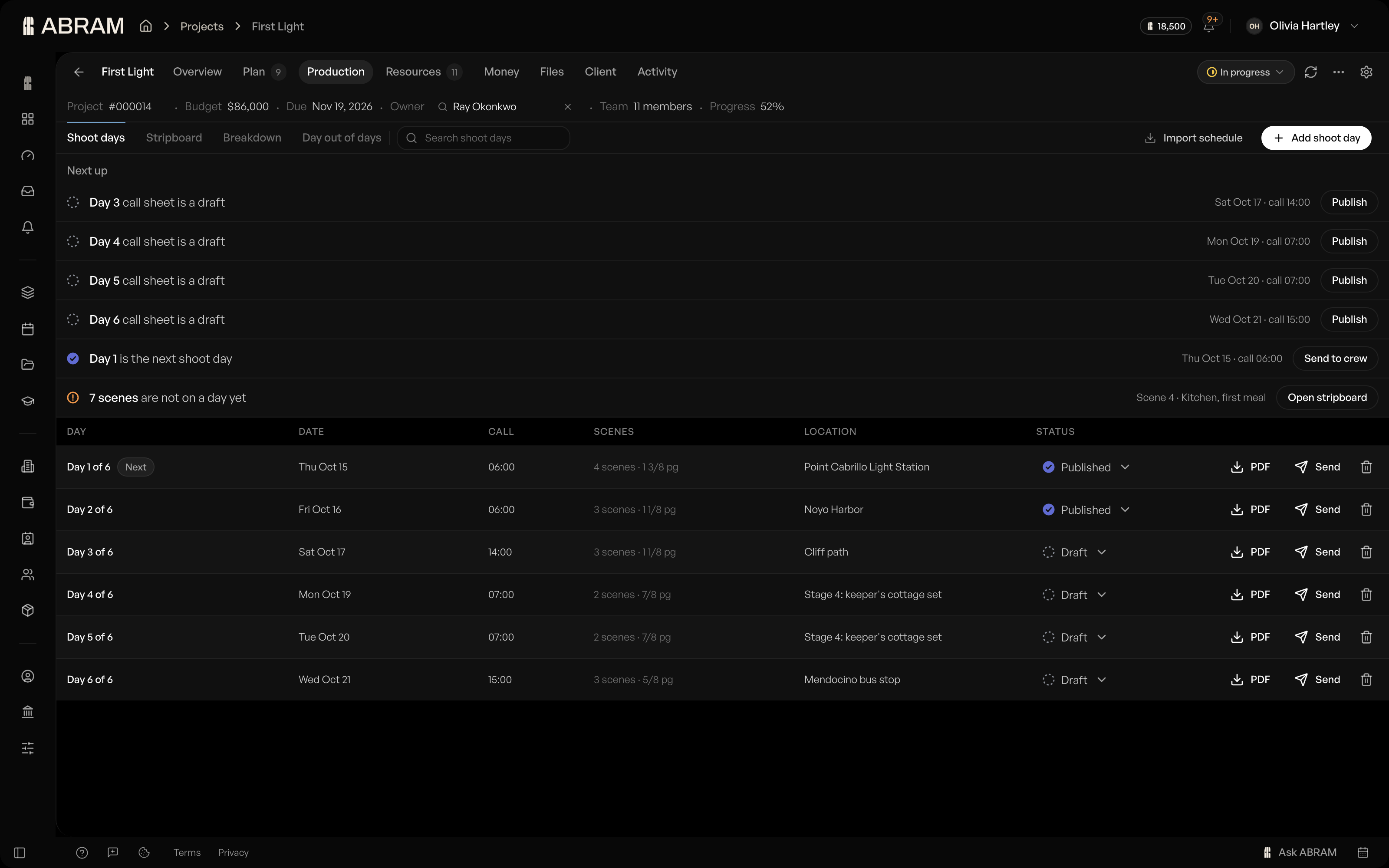 Next up: the call sheets still in draft, the next day to send and the scenes without a day.
Drag a strip to another day and it's rescheduled, with every day's totals updating as you go. Take one off the board and it waits in the unscheduled drawer. Elements live inside Breakdown as one library, where you merge duplicates and tidy up cast.
Budgets that keep up
Keep as many versions of a budget as you need, and make one primary: the one every total outside the budget counts. The overview at the top shows budget, committed, actual and what's left, with categories that open into their lines.
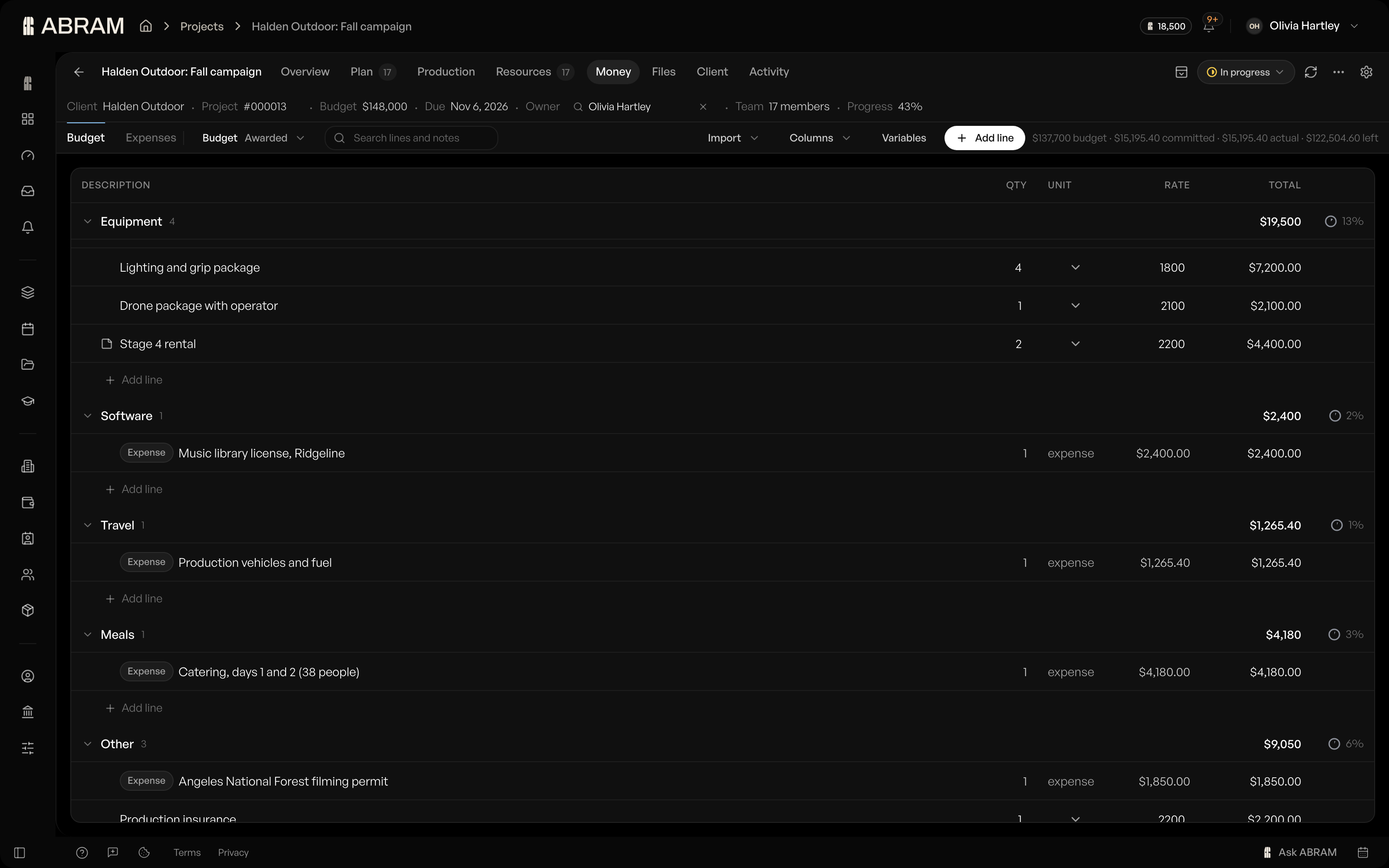 Budget, committed and left at the top, with every category and line beneath.
One switch shows the whole budget at cost or at what the client pays, and your columns stay the way you set them. Group by account to read a film budget as category, account and line, with each fringe under the line it applies to, and a percentage fringe recomputes the moment the figure under it changes. After an import, Compare shows the imported total beside today's total and actuals, account by account.
Let ABRAM staff the project
Assign with ABRAM proposes people and hours for every deliverable that still needs them, spreading the load across the whole project. Change or drop any row, and nothing is saved until you press Apply. Auto-fill roles finds people for your open roles on every plan, and you accept, skip or accept them all.
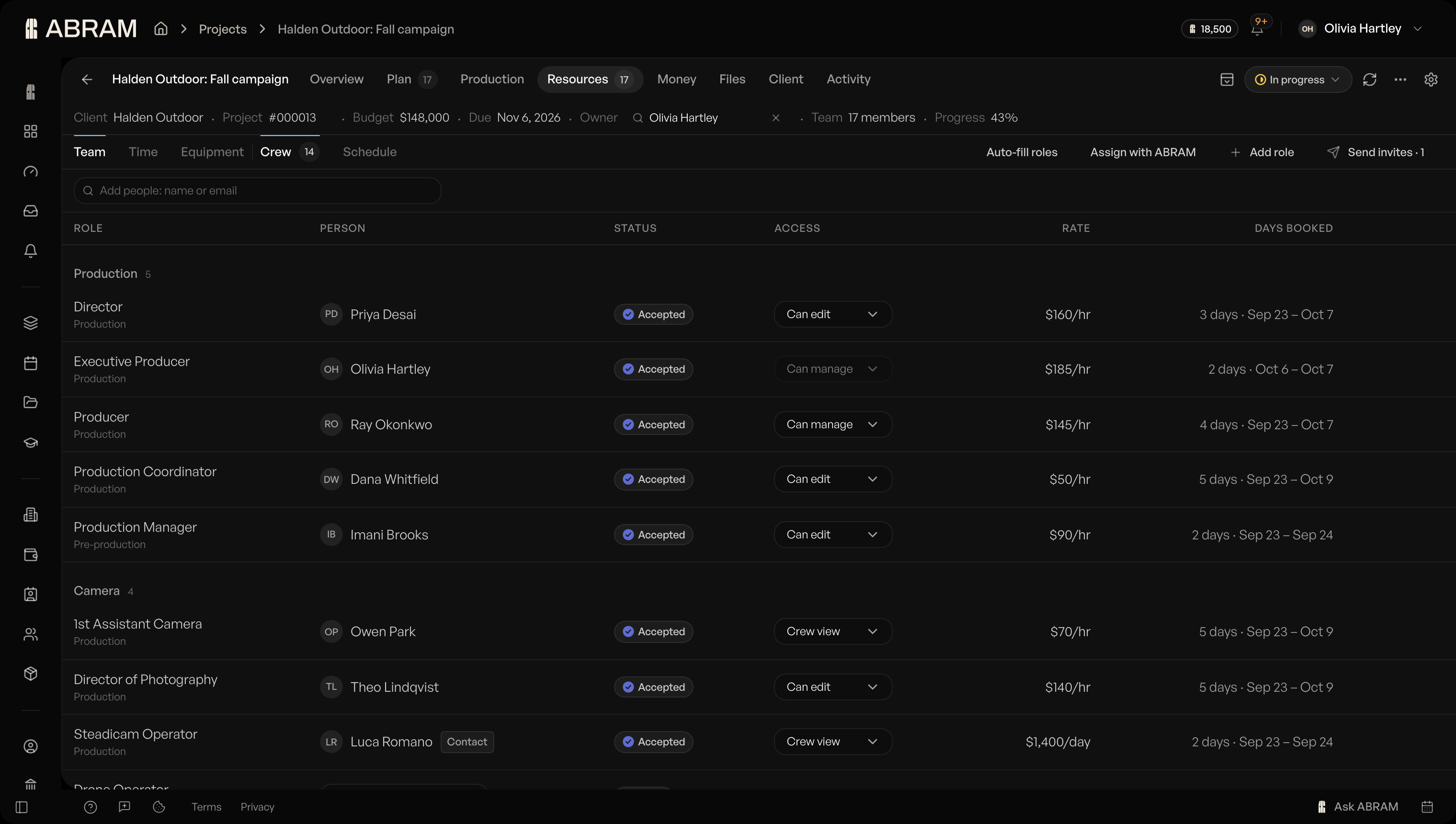 Assign with ABRAM and Auto-fill roles, right on the crew tab.
The crew tab has been rebuilt around a single field. Type a name to pick from your people, or an email to add someone new, and nobody hears from you until you press Send invites. Access comes down to three words, Can manage, Can edit and Crew view, and rates show only to managers and to each person on their own row. People from outside your organization never take a seat, with up to 2 per production on Free, 10 on Pro and 100 on Studio.
Your clients, in your portal
The client portal now carries your logo, accent colour and footer on every page, and your clients review the cut right inside it. Share a cut as a Vimeo link and your client pauses it, leaves a note at that exact timecode and approves it in the same place. The client rollup shows what's billed, what's outstanding, client health, first-pass approval and last activity for every client. The portal, video review and the client rollup are included on Pro and above.
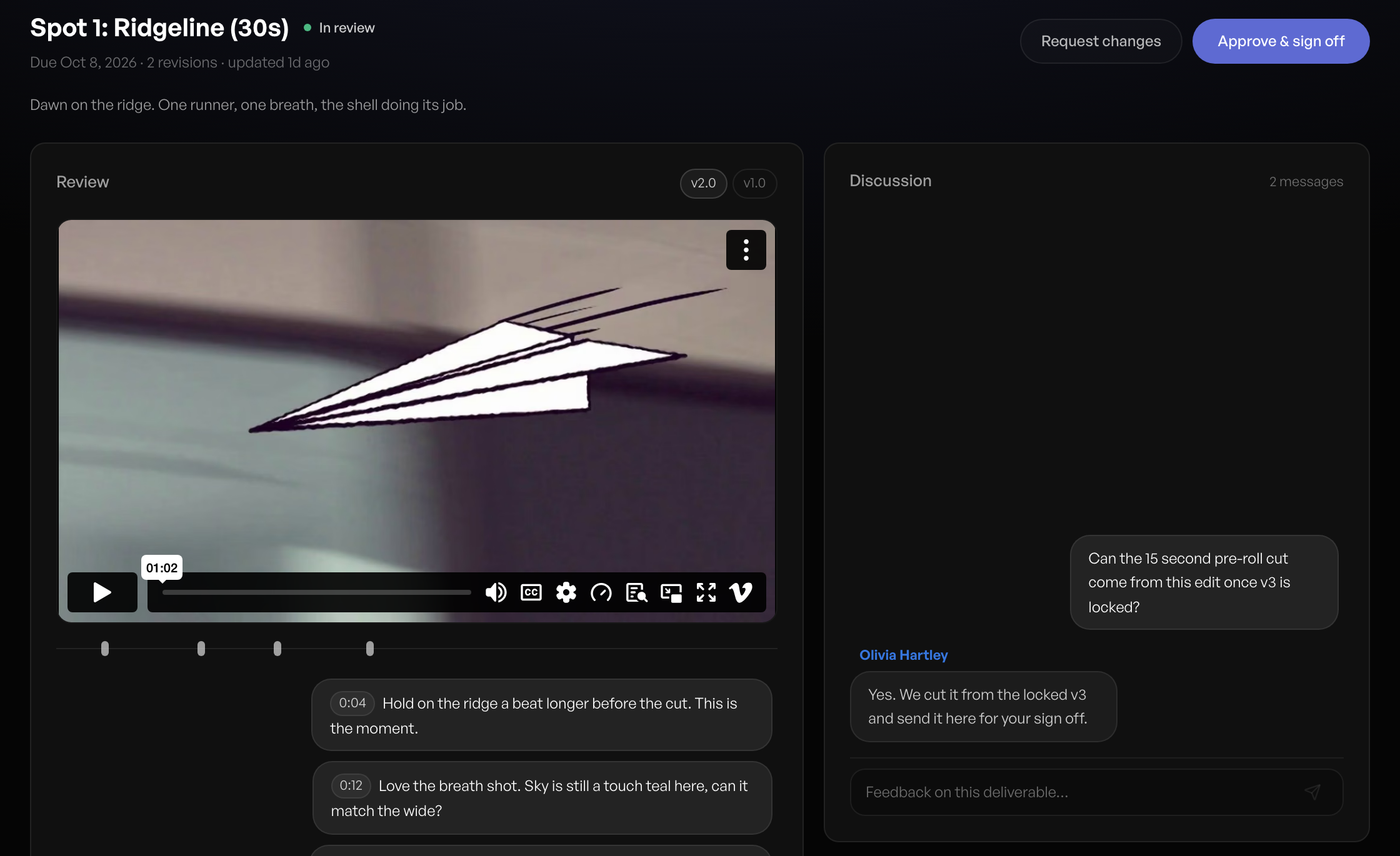 Your client reviews the cut in your portal, with notes at the exact second.
Calls turns a conversation into work. Paste or upload a client call transcript and ABRAM reads it for a summary, decisions, action items, scope changes and a draft quote change, and you add the parts you agree with. Calls is included on every plan. On Studio, an intake form with conditional sections and a live preview brings in new requests, which ABRAM reads for fit, capacity, budget and missing information before each one becomes a quote, then a project.
More from ABRAM, on your terms
ABRAM now reaches far more of the product: invoices and quotes, documents, wrap reports, your weekly recap, the client portal, project requests and the calendar. The reports, tables and charts it makes open beside the chat with their own versions, so asking for a change gives you the next one, ready to download or save to the project.
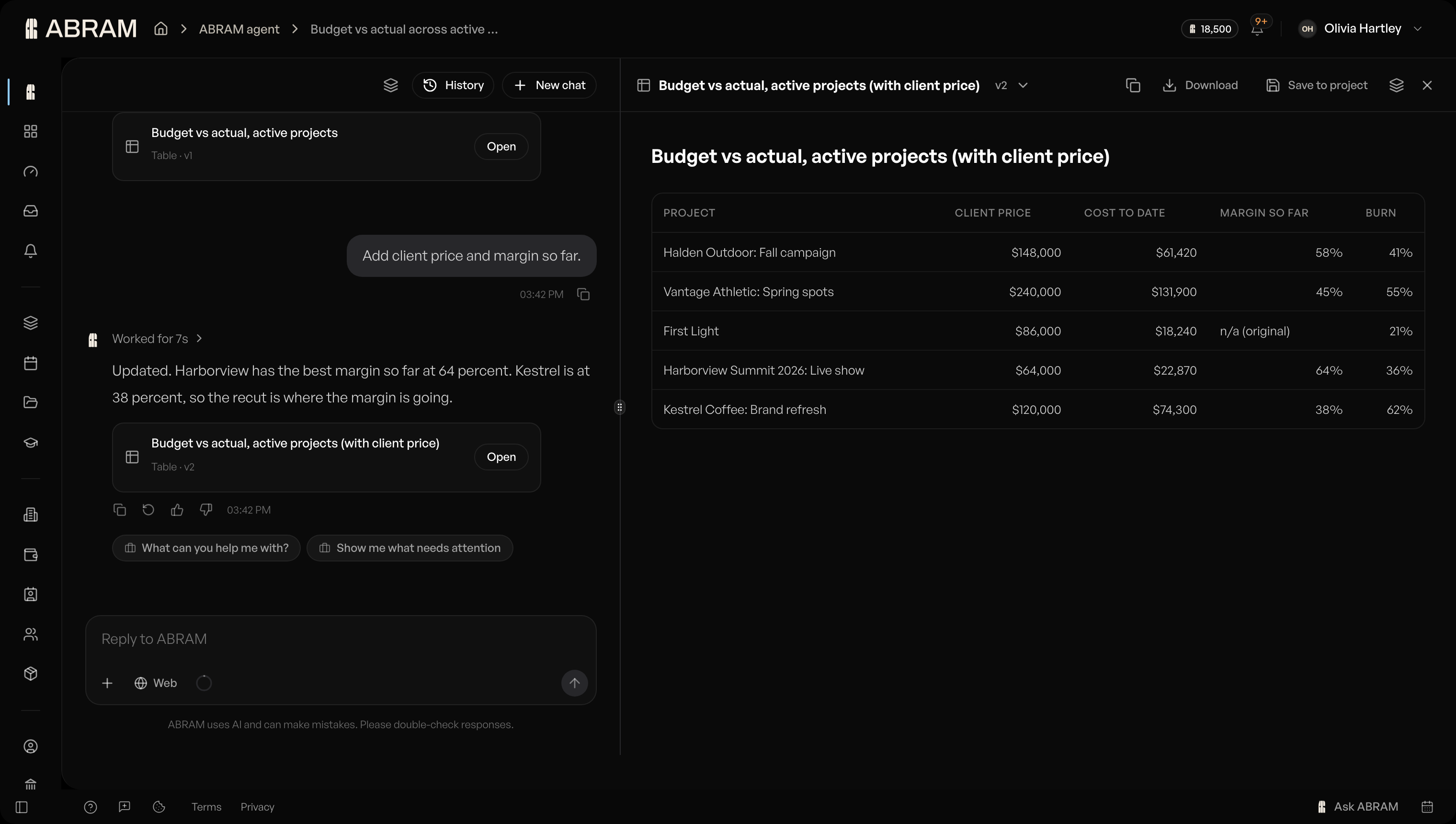 Ask ABRAM for a report and it opens beside the chat, ready to download or save.
You decide how far it goes. Owners and admins can set each thing ABRAM does to Ask first or Never and see a log of what it did, and the invoices and quotes it prepares are drafts for you to send. Pro and Studio include AI usage with every seat, with 3x more on Studio, and you can see what you've used as a percentage with the date it resets. Paid plans can turn on extra usage, billed monthly, with a spend limit you set.
ABRAM on your phone
Open ABRAM in your phone's browser and it opens screens built for the day, at the same address. Chat is home, and everything else is a tap away in the menu. Today shows what's next, your work for the week and your hours, and you check in when you arrive and wrap when you finish.
The calendar has month and day views, and on the day view you hold and drag to draw a booking. Create and send call sheets, run a script breakdown, open a work order with its crew, gear and pack list, browse documents, and keep up with your project conversations in the Inbox.
See every booking at once
Team management shows each person's week as named booking blocks, coloured by project, type, client or person. A project's equipment is one list, with what the shoot still needs on top beside a Book button and booked gear under its work order.
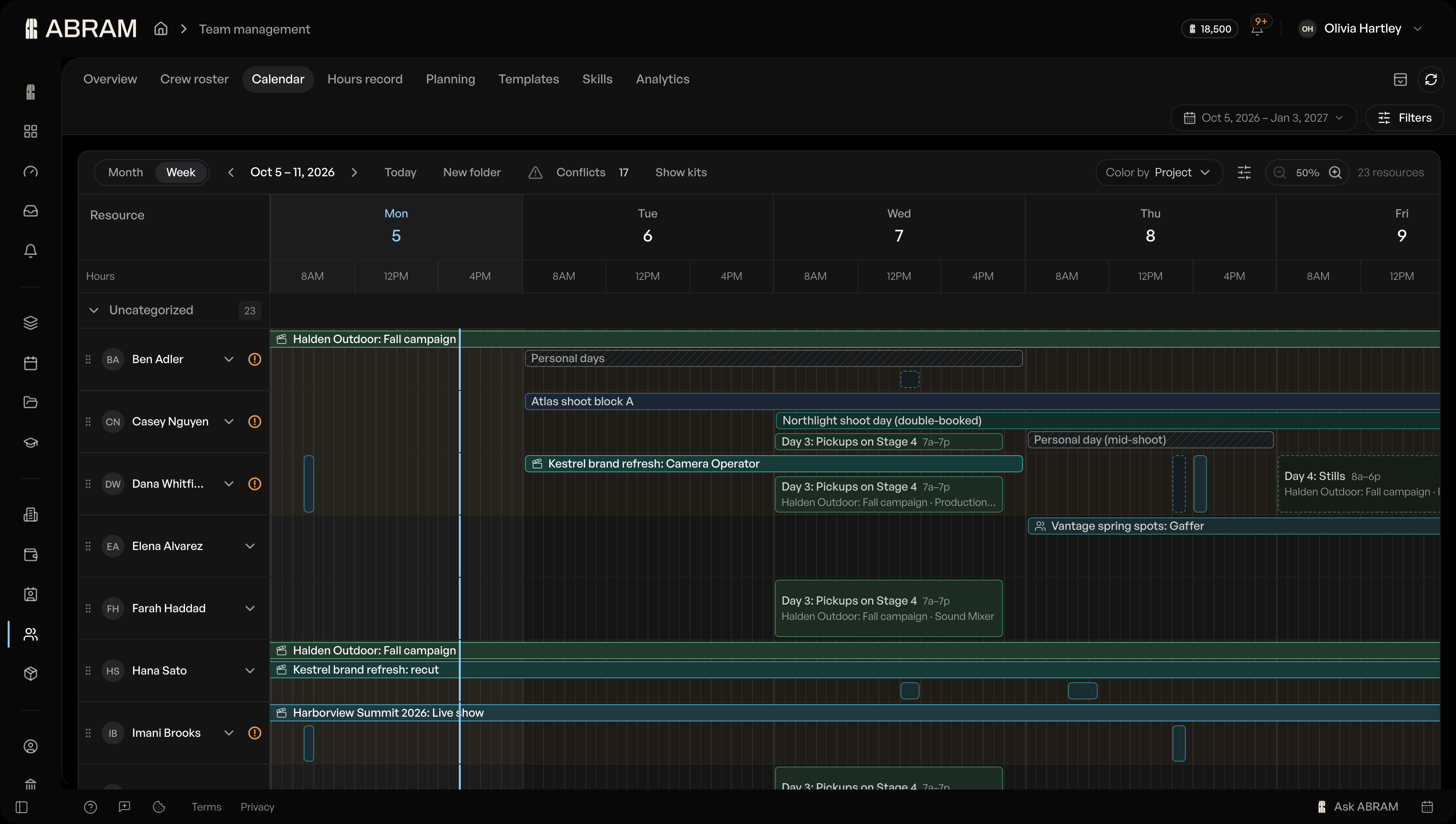 Every person's week as booking blocks, with conflicts counted at the top.
Each work order gets its own pack list, built from the gear booked on it, and the crew tick each item Packed, then Returned, from their phones. On Studio, the executive overview puts every production the company is running on one screen.
And there's more
- Your own calendar is free on every plan.
- One Slack connection for the whole company, with people linked by their email.
- One button creates a Frame.io project and links it.
- The Skills page is now Growth, Skills and Recap, with suggestions for skills you might add.
- Add finished work and screenshots to your profile's portfolio.
- Owners can make another member an owner or hand over ownership, on desktop and phone.
- Setting up a new workspace takes a few questions, and pasting your website fills in your company's name and logo.
- Crew who aren't on ABRAM now raise a booking conflict when they're double-booked.
- Translating a page with your browser no longer breaks it.
- A link to a page that doesn't exist now lands on a small film-set game.
Availability
ABRAM 2.0 is available today at app.abram.network on every plan: Free, Pro, Studio and SMB / Enterprise. Screens your plan doesn't include stay out of your way, and the pricing page shows what each plan adds.
Movie Magic is a trademark of Entertainment Partners. ABRAM is not affiliated with or endorsed by Entertainment Partners.